Upgrading K3s
I haven’t upgraded the K3s cluster in the homelab for quite some time. Now seemed like a good time to do a round of upgrades before starting a new project.
What has been upgraded:
| Item | New version |
|---|---|
| K3s cluster | v1.35.1+k3s1 |
| Calico | v3.31.x |
| ArgoCD | 3.x |
| Longhorn | 1.10.x (Helm chart version) |
| Sealed Secrets | 2.18.x (Helm chart version) |
| step-ca | 1.29.x (Helm chart version) |
| step-issuer | 1.9.9 (Helm chart version) |
| MetalLB | 0.15.3 (Helm chart version) |
| Prometheus | 28.13.x (Helm chart version) |
| Loki | 6.53.x (Helm chart version) |
| opentelemetry-collector | 0.146.1 (Helm chart version) |
| cert-manager | 1.19.x (Helm chart version) |
| pve-exporter | 3.8.1 |
An excerpt of the upgrade process is detailed in the following sections.
K3s
For K3s, the upgrade procedure boils down to:
Grab the latest version of the K3s installation script from https://get.k3s.io and overwrite the previous version stored in the Ansible role.
Change the release channel and version in the inventory:
--- a/inventory.ini
+++ b/inventory.ini
@@ -1,8 +1,8 @@
[all:vars]
# Channels and versions for k3s is located at
# https://update.k3s.io/v1-release/channels
-k3s_channel=v1.34
-k3s_version=v1.34.4+k3s1
+k3s_channel=v1.35
+k3s_version=v1.35.0+k3s1
k3s_install_script_src=installation_scripts/install_k3s.sh
k3s_install_script_dest=/usr/local/bin/install_k3s.sh
reinstall=false
Rerun the Ansible playbook with -e reinstall=true to trigger a
rerun of the installation script using the new version.
The playbook uses serial: 1 to upgrade a single node at a time,
starting with the control plane nodes before proceeding to the
worker nodes.
Thats it. I have yet to experience any issues with this approach and I commend the maintainers of K3s for providing a great upgrade experience.
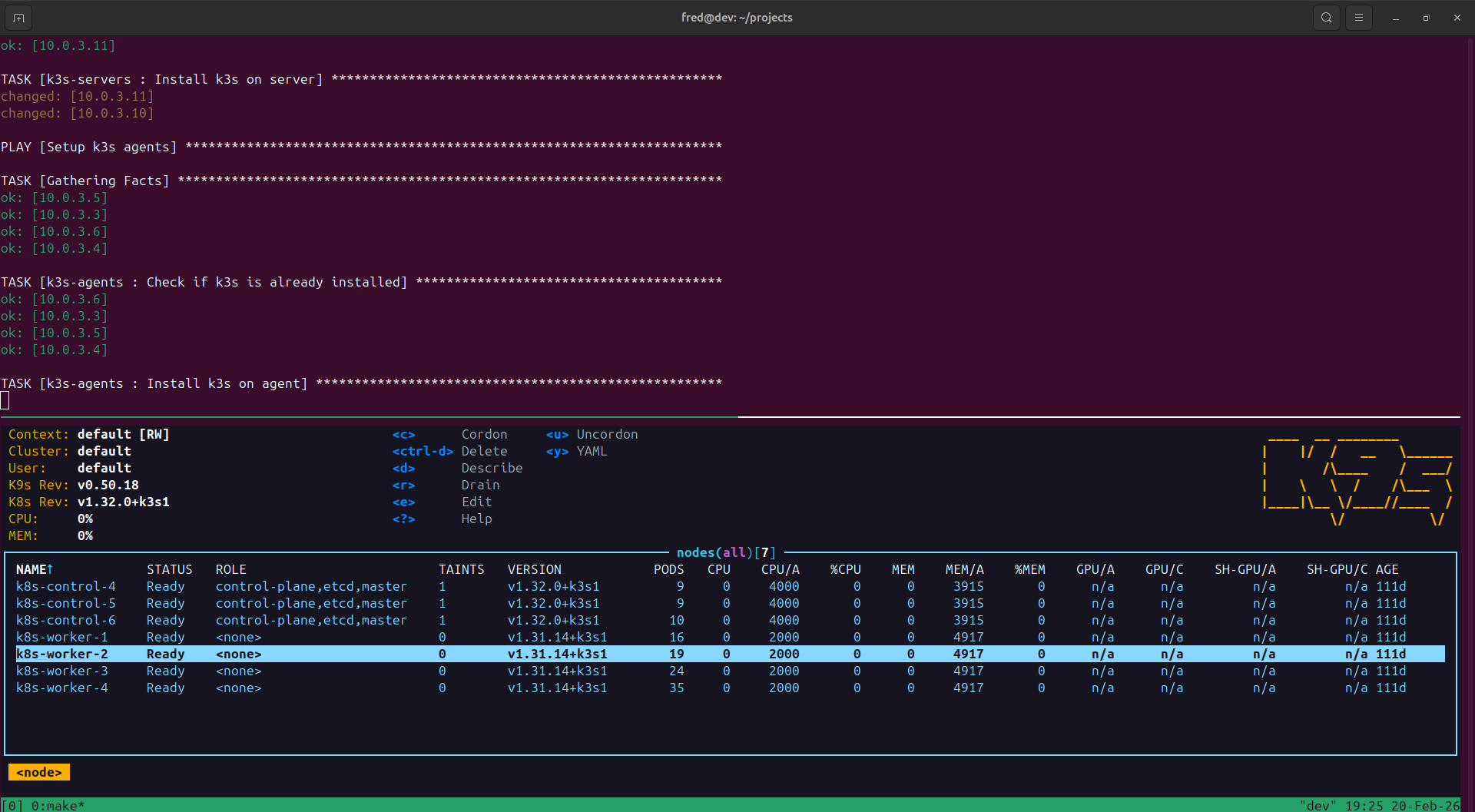
This is during the upgrade process to v1.32.0+k3s1. The control
plane nodes have been upgraded, worker nodes are in the process
of being upgraded:
Calico
When upgrading Calico there was an issue with the CPU architecture
of the control plane node VMs in Proxmox. I had not switched the
architecture from qemu to x86-64-v2-AES, resulting in this error:
csi-node-driver-registrar This program can only be run on AMD64 processors with v2 microarchitecture support.
calico-csi This program can only be run on AMD64 processors with v2 microarchitecture support.
When it started to fail I tried rolling back the version of Calico to
v3.30.x, but doing so proved more difficult (for several reasons)
than just going ahead with the upgrade. I drained the control plane nodes,
switched the VM CPU architecture, rebooted, and once all 3 nodes were
fixed I had version v3.31.x running.
Changes to the Terraform Proxmox VM config for control plane nodes:
--- a/environments/production/terraform.tfvars
+++ b/environments/production/terraform.tfvars
@@ -7,7 +7,7 @@ vms = [
     ip                  = "10.0.3.9/24"
     memory              = 4096
     cores               = 4,
-    cpu_architecture    = "qemu64"
+    cpu_architecture    = "x86-64-v2-AES"
     bootdisk_size       = "20"
     disks               = []
     tags                = ["k8s", "control", "ubuntu-24.04"]
@@ -20,7 +20,7 @@ vms = [
     ip                  = "10.0.3.10/24"
     memory              = 4096
     cores               = 4,
-    cpu_architecture    = "qemu64"
+    cpu_architecture    = "x86-64-v2-AES"
     bootdisk_size       = "20"
     disks               = []
     tags                = ["k8s", "control", "ubuntu-24.04"]
@@ -33,7 +33,7 @@ vms = [
     ip                  = "10.0.3.11/24"
     memory              = 4096
     cores               = 4
-    cpu_architecture    = "qemu64"
+    cpu_architecture    = "x86-64-v2-AES"
     bootdisk_size       = "20"
     disks               = []
     tags                = ["k8s", "control", "ubuntu-24.04"]
ArgoCD
ArgoCD had a long chain of releases since my last upgrade, reading changelogs
took most of the time. Not only was the major version of ArgoCD itself bumped
from 2.x to 3.x (upgrade notes),
but the Helm chart had gone through a few major releases from 7.xto 9.x.
I had to follow the advice in this issue
and disable redis.ha temporarily to be able to upgrade to 8.x. The upgrade
from 8.x to 9.x did not cause any issues.
Longhorn
Longhorn was time-consuming since each version upgrade was preceded by an offsite
backup of all volumes. I upgraded from version 1.8.x to 1.10.x.
My Longhorn installation has a tendency to attach all volumes to a single worker node,
which sometimes overloads the node and causes instability. It does eventually stabilize
after each upgrade, but I haven’t found the root cause yet.
Prometheus
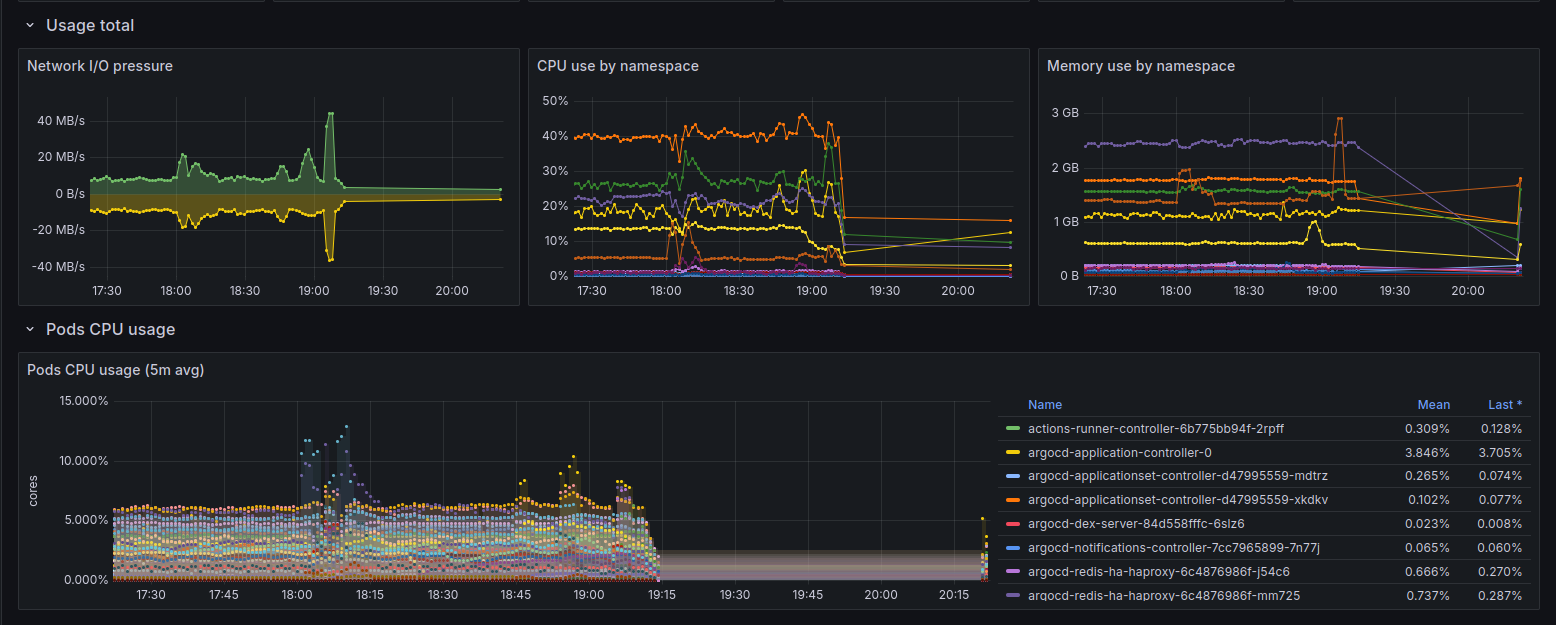
I temporarily lost some cluster metrics due to a missing port in a NetworkPolicy
after upgrading the Prometheus chart from 27.x to 28.x (starting point was 26.x):
I crosschecked the traffic in Whisker and calico-flow-logs-otlphttp-exporter to identify the blocked port:

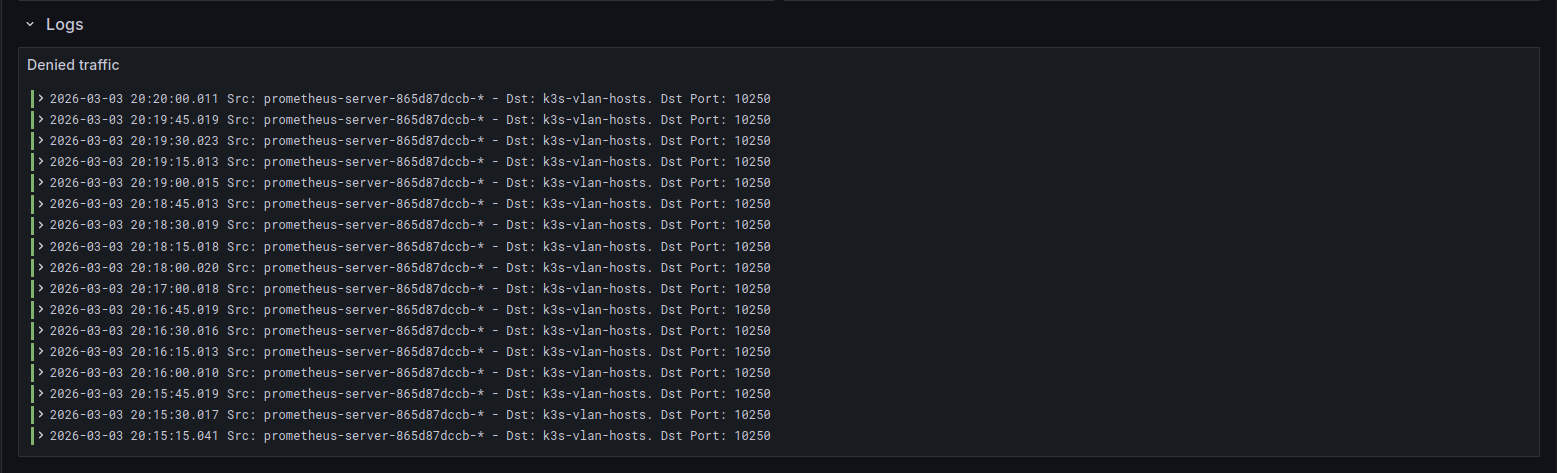
Updating the ports in the NetworkPolicy for traffic from Prometheus to the K3s VLAN fixed it:
--- a/prometheus/allow_egress_to_k3s_vlan_netpol.yaml
+++ b/prometheus/allow_egress_to_k3s_vlan_netpol.yaml
@@ -15,3 +15,4 @@ spec:
         ports:
           - 80
           - 7472
+          - 10250
Conclusion
Using Ansible to manage cluster configuration and ArgoCD to manage applications is one of the better investments I’ve made in the homelab. Most of my time spent upgrading is reading changelogs, taking backups of persistent data and updating config. I don’t really have to worry about versioning or how to apply changes.