Upgrading the Proxmox cluster from 8 to 9 in the homelab
Proxmox 9 was released in August. I’ve focused the past few weeks on migrating from Flannel to Calico, and with the CNI-switch in K3s out of the way I was able to dedicate time to upgrade Proxmox.
Proxmox has a pretty nice guide for upgrading from 8 to 9. I opted for doing an in-place upgrade this time as opposed to reinstalling the entire OS. I did a mix of one-off commands and running a temporary Ansible playbook against each host.
The Proxmox cluster as it stands currently:
graph LR
  subgraph cluster[Datacenter: pve-cluster-1]
    pve2
    pve3
    pve4
  end
  subgraph pve2[Node: pve2]
    pve2_vms[VMs]
  end
  subgraph pve3[Node: pve3]
    pve3_vms[VMs]
  end
  subgraph pve4[Node: pve4]
    pve4_vms[VMs]
  end
Upgrades were done in the following order:
pve2 -> pve3 -> pve4
Upgrade process performed on each node:
- Migrate all VMs to another node in the cluster
- Upgrade the node to the latest
8.4.xversion - Run
pve8to9 --fulland fix reported errors - Perform the upgrade from 8 to 9
- Migrate VMs back to the upgraded node
Then the Terraform provider in all configs for Proxmox VMs was updated to the latest version.
Preparing for the upgrade
I had to fix this prior to starting (more info):
Removable bootloader found at '/boot/efi/EFI/BOOT/BOOTX64.efi', but GRUB packages not set up to update it!
Run the following command:

echo 'grub-efi-amd64 grub2/force_efi_extra_removable boolean true' | debconf-set-selections -v -u

Then reinstall GRUB with 'apt install --reinstall grub-efi-amd64'
A reboot later it was fixed.
Performing the upgrade
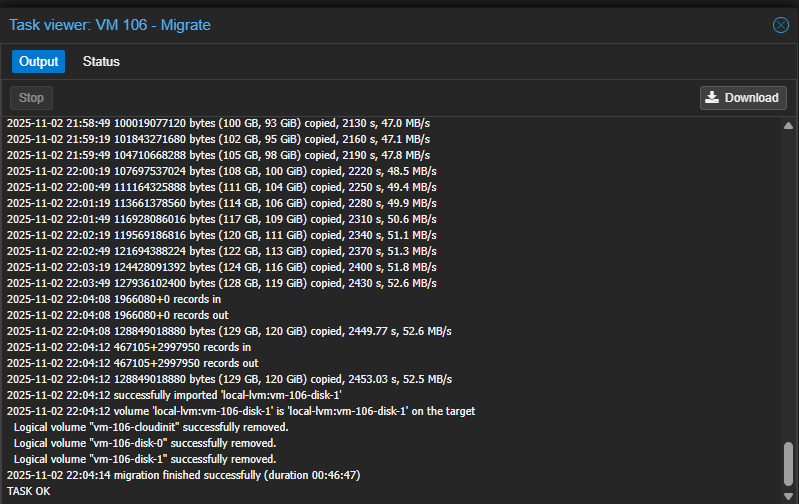
Migrating VMs takes a long time for the K3s nodes dedicated to storage. Each of those VMs has a large disk reserved specifically for Longhorn:
I ran pve8to9 --full to identify and fix issues
before starting the upgrade:
pve8to9 --full
...
= SUMMARY =

TOTAL:    48
PASSED:   39
SKIPPED:  5
WARNINGS: 1
FAILURES: 0

ATTENTION: Please check the output for detailed information!
The systemd-boot package had to be removed:
systemd-boot meta-package installed. This will cause problems on upgrades of other boot-related packages. Remove ‘systemd-boot’. See https://pve.proxmox.com/wiki/ Upgrade_from_8_to_9#sd-boot-warning for more information.
For nodes pve3 and pve4 I opted to remove the package
using an Ansible role, but for pve2 (which was the
initial host) I did it manually:
apt remove systemd-boot
Fixed all of the apt sources:
sed -i 's/bookworm/trixie/g' /etc/apt/sources.list
sed -i 's/bookworm/trixie/g' /etc/apt/sources.list.d/*.list*
Cleaned up the Grafana apt repository sources used to install
promtail for log collection:
wget -q -O - https://apt.grafana.com/gpg.key | gpg --dearmor | tee /etc/apt/keyrings/grafana.gpg > /dev/null
echo "deb [signed-by=/etc/apt/keyrings/grafana.gpg] https://apt.grafana.com stable main" | tee -a /etc/apt/sources.list.d/grafana.list
rm /etc/apt/sources.list.d/apt_grafana_com.list
rm /etc/apt/trusted.gpg.d/grafana.asc
Replaced privilege VM.Monitor with Sys.Audit in the Terraform
provisioning user role since VM.Monitor is deprecated in Proxmox 9.
Also switched to privileges listed in the bpg provider docs, even if
they are a bit excessive:
roles/create-terraform-provisioning-user/vars/main.yaml:
diff --git a/roles/create-terraform-provisioning-user/vars/main.yaml b/roles/create-terraform-provisioning-user/vars/main.yaml
index 7a98193..8ca22be 100644
--- a/roles/create-terraform-provisioning-user/vars/main.yaml
+++ b/roles/create-terraform-provisioning-user/vars/main.yaml
@@ -2,4 +2,4 @@ terraform_user_token_name: proxmox-kubernetes-terraform-setup
 terraform_provider_role:
-terraform_user_token_role_privileges: "Datastore.AllocateSpace Datastore.Audit Pool.Allocate Sys.Audit Sys.Console Sys.Modify VM.Allocate VM.Audit VM.Clone VM.Config.CDROM VM.Config.Cloudinit VM.Config.CPU VM.Config.Disk VM.Config.HWType VM.Config.Memory VM.Config.Network VM.Config.Options VM.Migrate VM.Monitor VM.PowerMgmt SDN.Use"
+terraform_user_token_role_privileges: "Datastore.AllocateSpace Datastore.AllocateTemplate Datastore.Audit Pool.Allocate Sys.Audit Sys.Console Sys.Modify VM.Allocate VM.Audit VM.Clone VM.Config.CDROM VM.Config.Cloudinit VM.Config.CPU VM.Config.Disk VM.Config.HWType VM.Config.Memory VM.Config.Network VM.Config.Options VM.Migrate VM.PowerMgmt VM.GuestAgent.Audit SDN.Use"
Made a temporary role to help prepare hosts for the upgrade:
roles/upgrade-pve8-to-pve9/tasks/main.yaml:
- name: Remove old systemd-boot package
  ansible.builtin.apt:
    name: systemd-boot
    state: absent

# https://pve.proxmox.com/wiki/Upgrade_from_8_to_9#LVM/LVM-thin_storage_has_guest_volumes_with_autoactivation_enabled
- name: Fix LVM/LVM-thin storage has guest volumes with autoactivation enabled
  ansible.builtin.command:
    cmd: /usr/share/pve-manager/migrations/pve-lvm-disable-autoactivation --assume-yes
The role for adding apt repositories was permanently changed and now also uses the new DEB822 source format:
roles/update-apt-repositories/tasks/main.yaml:
diff --git a/roles/update-apt-repositories/tasks/main.yaml b/roles/update-apt-repositories/tasks/main.yaml
index 8e0c240..8ce693c 100644
--- a/roles/update-apt-repositories/tasks/main.yaml
+++ b/roles/update-apt-repositories/tasks/main.yaml
@@ -1,30 +1,59 @@
 ---
-# https://pve.proxmox.com/pve-docs/pve-admin-guide.html#sysadmin_package_repositories
-- name: Remove pve-enterprise repository from list
+- name: Add Debian base repositories
   block:
-  - apt_repository:
-      repo: deb https://enterprise.proxmox.com/debian/pve bookworm pve-enterprise
-      state: absent
-      filename: /etc/apt/sources.list.d/pve-enterprise.list
-      update_cache: false
-  - apt_repository:
-      repo: deb https://enterprise.proxmox.com/debian/ceph-quincy bookworm enterprise
-      state: absent
-      filename: /etc/apt/sources.list.d/ceph.list
-      update_cache: false
+  - ansible.builtin.deb822_repository:
+      enabled: true
+      name: debian
+      types:
+      - deb
+      - deb-src
+      uris: http://deb.debian.org/debian/
+      suites:
+      - trixie
+      - trixie-updates
+      components:
+      - main
+      - non-free-firmware
+      signed_by: /usr/share/keyrings/debian-archive-keyring.gpg
+  - ansible.builtin.deb822_repository:
+      enabled: true
+      name: debian-security
+      types:
+      - deb
+      - deb-src
+      uris: http://security.debian.org/debian-security/
+      suites:
+      - trixie-security
+      components:
+      - main
+      - non-free-firmware
+      signed_by: /usr/share/keyrings/debian-archive-keyring.gpg

-- name: Add pve-no-subscription repository to list
-  block:
-  - apt_repository:
-      repo: deb http://download.proxmox.com/debian/pve bookworm pve-no-subscription
-      state: present
-      filename: /etc/apt/sources.list.d/pve-enterprise.list
-      update_cache: false
-  - apt_repository:
-      repo: deb http://download.proxmox.com/debian/ceph-quincy bookworm no-subscription
-      state: present
-      filename: /etc/apt/sources.list.d/ceph.list
-      update_cache: false
+- name: Add Proxmox no-subscription repository
+  ansible.builtin.deb822_repository:
+    enabled: true
+    name: proxmox
+    types:
+    - deb
+    uris: http://download.proxmox.com/debian/pve
+    suites:
+    - trixie
+    components:
+    - pve-no-subscription
+    signed_by: /usr/share/keyrings/proxmox-archive-keyring.gpg
+
+- name: Add Ceph repositories
+  ansible.builtin.deb822_repository:
+    enabled: true
+    name: ceph
+    types:
+    - deb
+    uris: http://download.proxmox.com/debian/ceph-squid
+    suites:
+    - trixie
+    components:
+    - no-subscription
+    signed_by: /usr/share/keyrings/proxmox-archive-keyring.gpg
...
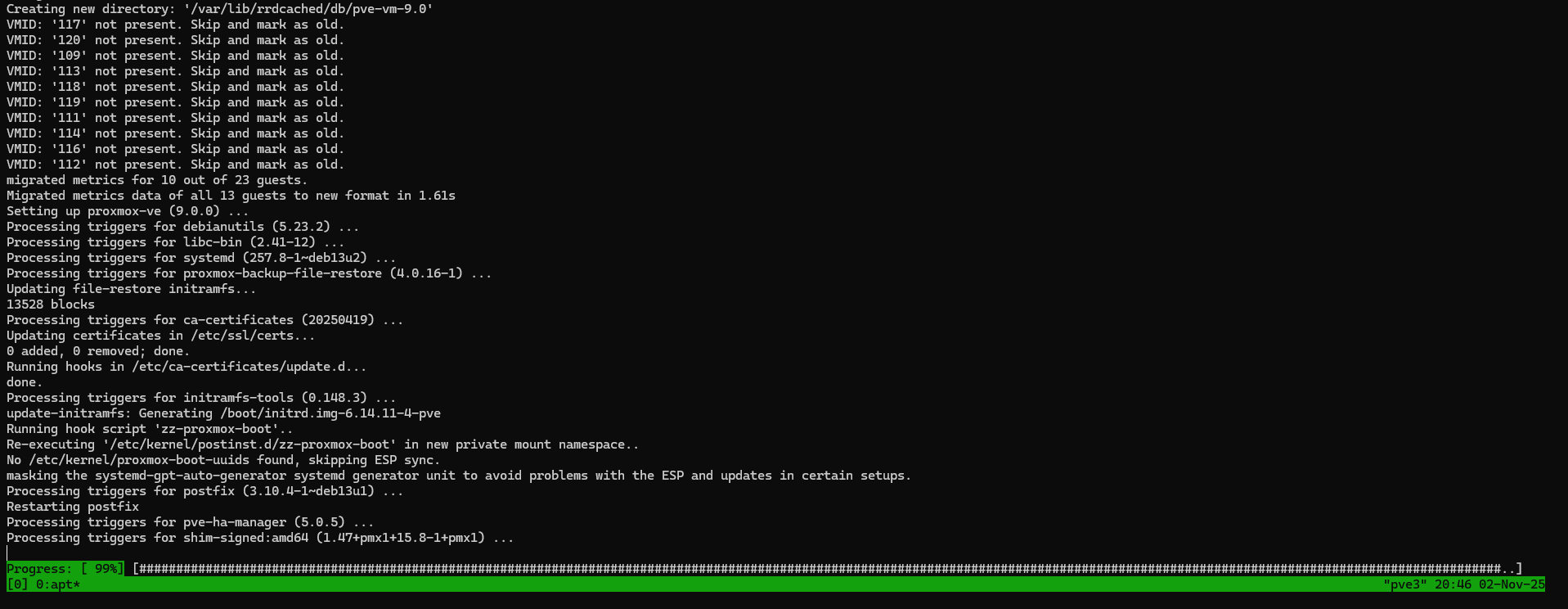
Then I did the actual upgrade manually:
apt dist-upgrade
After rebooting I fixed the old apt sources:
apt modernize-sources
The following files need modernizing:
  - /etc/apt/sources.list
  - /etc/apt/sources.list.d/grafana.list

Modernizing will replace .list files with the new .sources format,
add Signed-By values where they can be determined automatically,
and save the old files into .list.bak files.

This command supports the 'signed-by' and 'trusted' options. If you
have specified other options inside [] brackets, please transfer them
manually to the output files; see sources.list(5) for a mapping.

For a simulation, respond N in the following prompt.
Rewrite 2 sources? [Y/n] Y
Modernizing /etc/apt/sources.list...
- Writing /etc/apt/sources.list.d/debian.sources

Modernizing /etc/apt/sources.list.d/grafana.list...
- Writing /etc/apt/sources.list.d/grafana.sources
Reran the playbook to remove the enterprise repo file again and verified apt worked after the changes:
apt update
Hit:1 http://deb.debian.org/debian trixie InRelease
Hit:2 http://deb.debian.org/debian trixie-updates InRelease
Hit:3 http://security.debian.org/debian-security trixie-security InRelease
Hit:4 https://apt.grafana.com stable InRelease
Hit:5 http://download.proxmox.com/debian/ceph-squid trixie InRelease
Hit:6 http://download.proxmox.com/debian/pve trixie InRelease
All packages are up to date.
I noticed “IO Pressure Stall” increasing drastically when migrating VMs to a node running version 9 from a node running version 8:
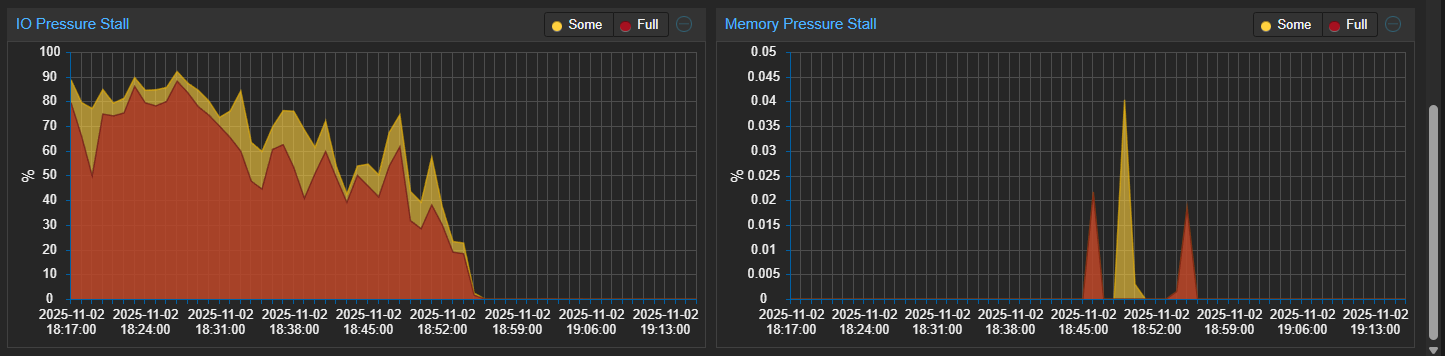
This was reflected in some of the VMs running on the
affected Proxmox host, among them being k8s-control-5:
kubectl get nodes
NAME            STATUS                        ROLES                       AGE   VERSION
k8s-control-4   Ready                         control-plane,etcd,master   45h   v1.31.7+k3s1
k8s-control-5   NotReady                      control-plane,etcd,master   44h   v1.31.7+k3s1
k8s-control-6   Ready                         control-plane,etcd,master   44h   v1.31.7+k3s1
k8s-worker-1    Ready                         <none>                      44h   v1.31.7+k3s1
k8s-worker-2    NotReady,SchedulingDisabled   <none>                      44h   v1.31.7+k3s1
k8s-worker-3    Ready                         <none>                      44h   v1.31.7+k3s1
k8s-worker-4    Ready                         <none>                      44h   v1.31.7+k3s1
There is a Reddit thread describing a similar issue
even on fresh Proxmox 9 installations. The IO Pressure
Stall has since been reduced. This is the month maximum
for pve2:
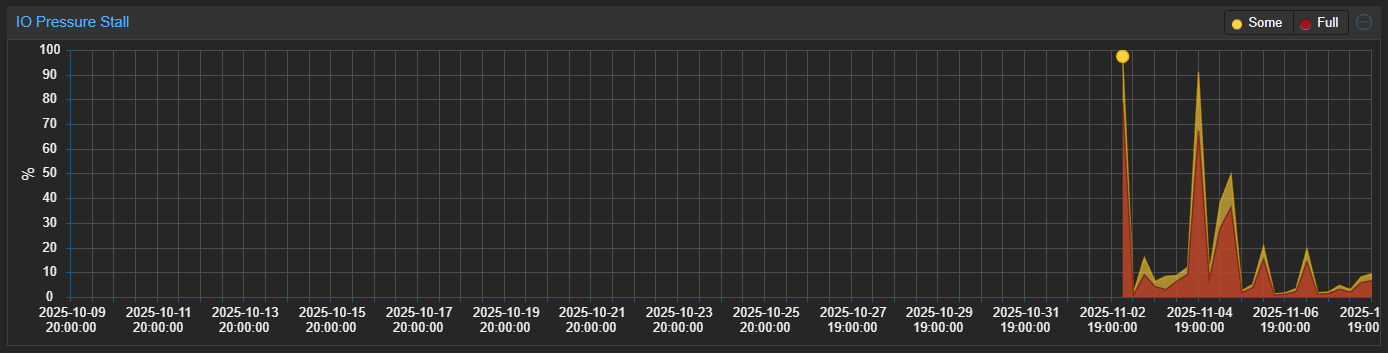
VMs have been stable after the migration, so I’m going to just keep monitoring for now.
Upgrading Terraform provider
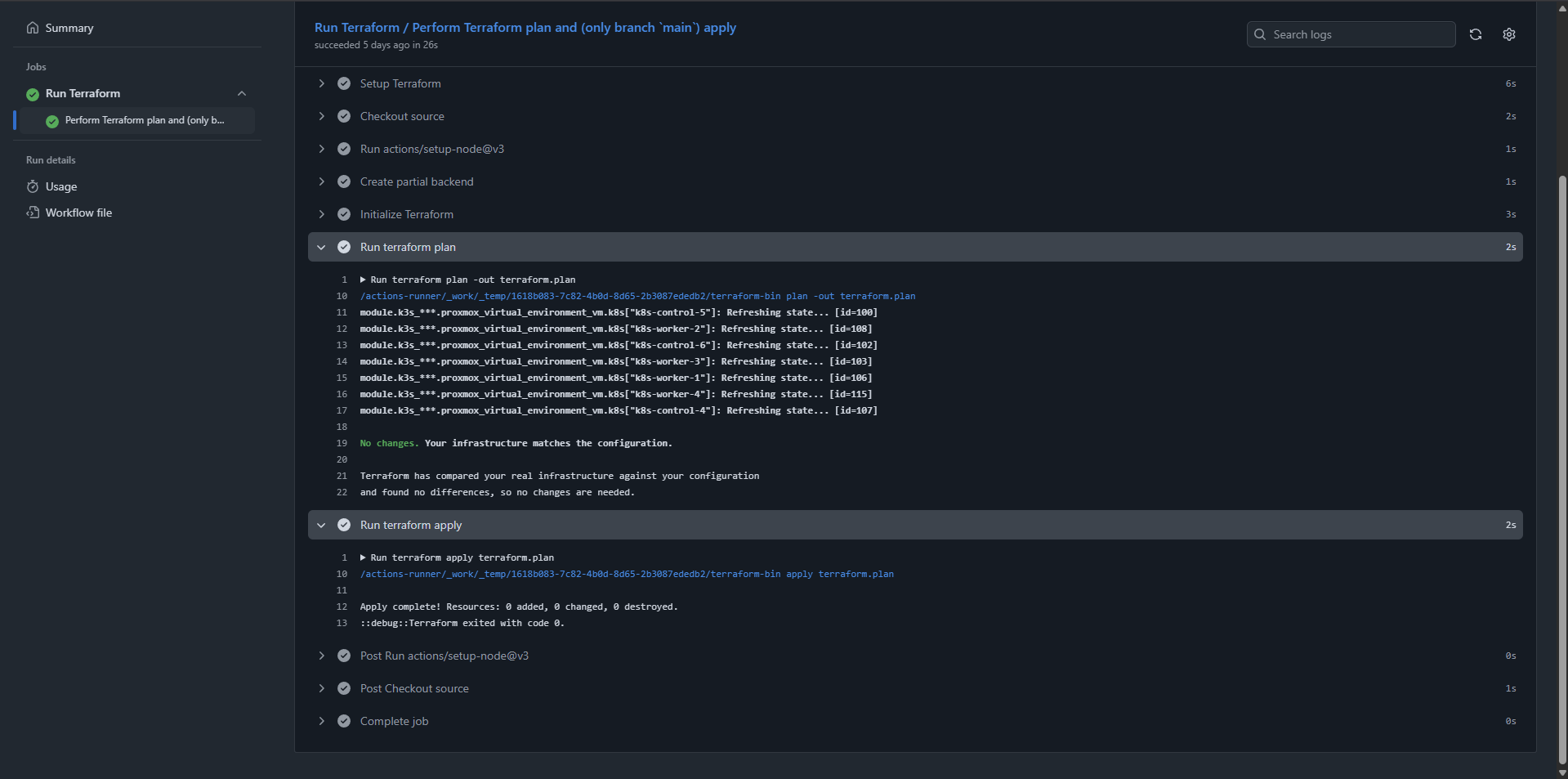
I’ve changed Terraform provider for Proxmox VM configuration to the bpg provider over the last few years. Upgrading to the latest version of the provider (0.86.0 as of this writing) worked without any issues:
Conclusion
The tools and guides for preparing and performing in-place upgrades of Proxmox are quite good. With the exception of the IO Pressure Stall situation, everything went smoothly.
Resources: